
Sony LSY400HN01-002 Panel No Display Solution
How to Fix Sony Panel RT6930GQW Protection Learn how to diagnose this Sony no display fault. This panel, LSY400HN01-002, is used in various Sony models. When this unit arrived to me, its display was not coming on. The sound was perfect. No red light was blinking, no error was showing, only the picture was missing.
LSY400HN01-002 Panel inspection
I opened this Sony LED TV in the workshop lab and checked the VCC 12V of its panel. It was there. This panel uses DC to DC IC RT6929 and uses IC RT6930 for scan drive. All its DC voltages were being generated. I also tested its LVDS signals, and they were also fine. The CKV signal was also properly generated, but the panel was not displaying.
RT6930GQW Protection Problem Bypass
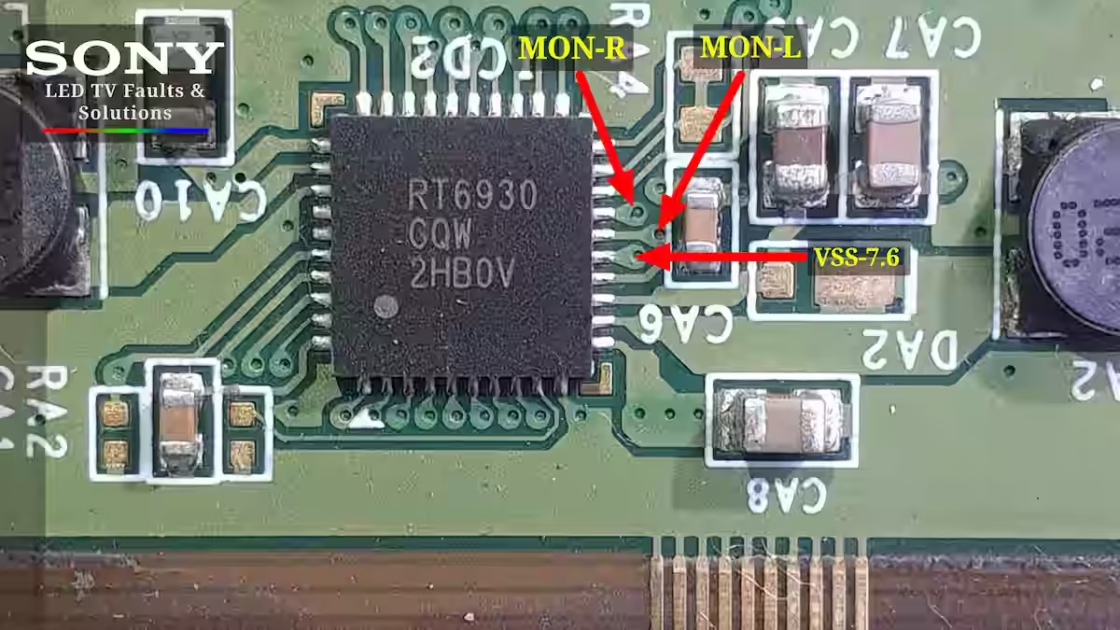
Now I had to isolate the pins 15, 16, and 17 of its scan drive IC RT6930 from the scalar strip of the panel. Usually, people cut these pins completely along with the IC and cut the PCB circuit. This method is not correct according to my experience. These pins of this IC go on the left and right side of the scalar strip, and their names are MON-R and MON-L, and pin number 15 is VSS. Here minus 7.6V is applied.
Comprehensive Sony LSY400HN01-002 panel RT6930GQW scan drive IC protection bypass with annotated points and left-right scalar strip for no display fault
These connections are connected to the chip-on-film, so it is easier to cut them from here. Suppose you have to reconnect these connections; you can do it very easily. In this case, when I disconnected these points, my fault was fixed.
- These pins are disconnected from the scaler strip.
- Pin 15 VSS-7.5V
- Pin 16 MON-L
- Pin 17 MON-R
My experience for this panel
I have shared this fault with my own hands. This is the protection of this panel, which we removed, and the no-display fault was fixed. But this fault is not necessarily the solution to the no display, and there can be other causes. For example, the CKV short circuit is from one side of the fault. It depends on your skill and how expert you are in fault finding.
Conclusion
How to Fix Sony Panel RT6930GQW Protection We have fixed Sony’s No Display Fault in this article. We have explained how to remove the protection of its Scan Drive IC step by step. Sony LED TV Repair has published a method to diagnose this fault in the best way so that fellow technicians can benefit from it. If you have any questions related to this fault, write in the comment box.
FAQ
Q1: My Sony LSY400HN01-002 panel has no display but sound is fine — where should I start checking?
A: First, check the panel’s 12V VCC. Then verify DC voltages from RT6929 (DC-DC) and RT6930 (scan drive). Also check LVDS and CKV signals. If all voltages and signals are normal but the display is still blank, the problem is likely inside the scan drive connections.
Q2: How do I fix the RT6930GQW Protection on this panel without damaging the PCB?
A: Isolate pins 15 (VSS -7.5V), 16 (MON-L), and 17 (MON-R) from the scalar strip. Do not cut the IC or PCB circuit completely — just disconnect these points from the chip-on-film. This bypass removes the protection and restores the display. You can reconnect later if needed.
Q3: Is this the only cause for ‘No Display’ on this panel?
A: No — this is one method I used successfully, but other faults like a CKV short can also cause no display. Correct diagnosis depends on your skill in fault finding. Always check voltages and signals before isolating the scan drive pins.
Sony KLV-46BX450 6 blink error solution
Sony KD-55X9000A Red Light Blinking Fix

Shaukat Ali has over 30 years of experience in LED TV repair, specializing in chip-level repair work. He is an expert in Sony LED TVs, and also repairs other major brands like Samsung, TCL, Orient, and Haier. His expertise includes display panel faults, motherboard issues, power supply circuits, T-Con, and HDMI faults. Based in Lahore, he shares real-time fault finding cases from daily repair work to help technicians and learners with practical experience.
📞 Contact: +92 321 4066054