
Complete Blink Codes Troubleshooting Guide
KD-65X9500G All Blinking Codes Explained: Professional Repair Guide Step-by-Step Blinking Error Code Solution In this article, we will look at all the blinking error codes in this series in detail and what the solutions are. The common fault is 4 blink errors. We will explain this in the light of real technician experience.
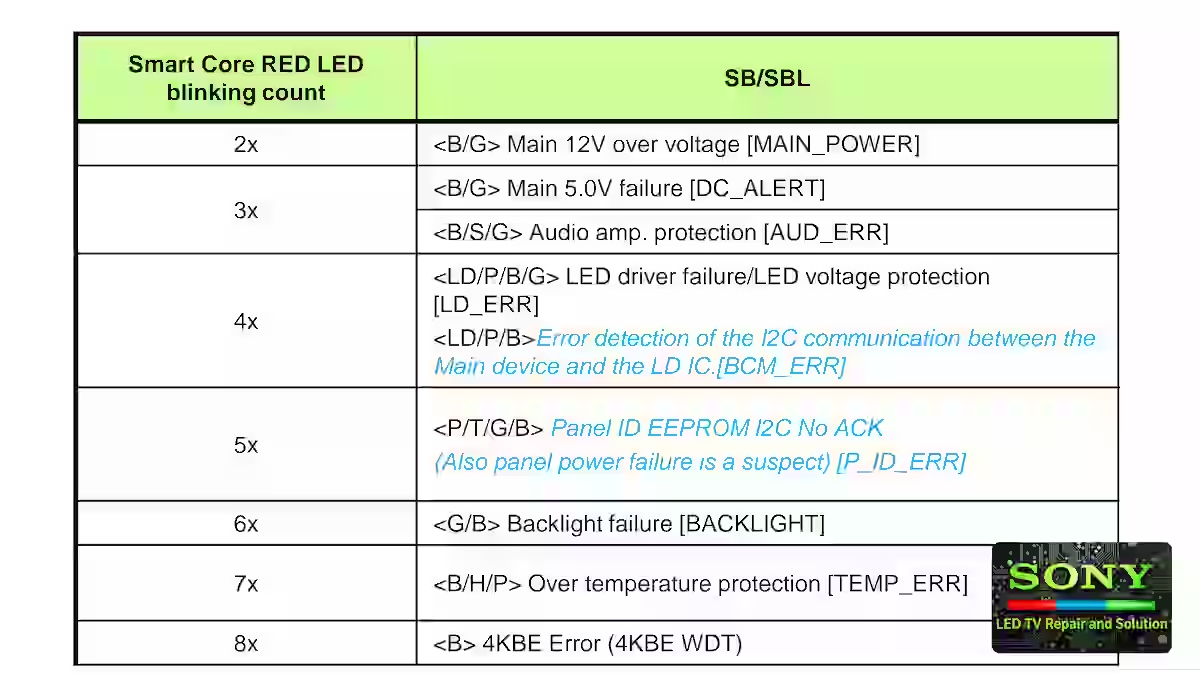
Smart core Red LED blinking count
To get to the exact cause, look at the image below carefully. In it, you will find the Smart CORE red light blinking count. There are possible sections in which the fault can occur. These blinking error codes are from 2 to 8. Moving forward, we will understand all of them separately in detail, how they work, and what their solutions are.
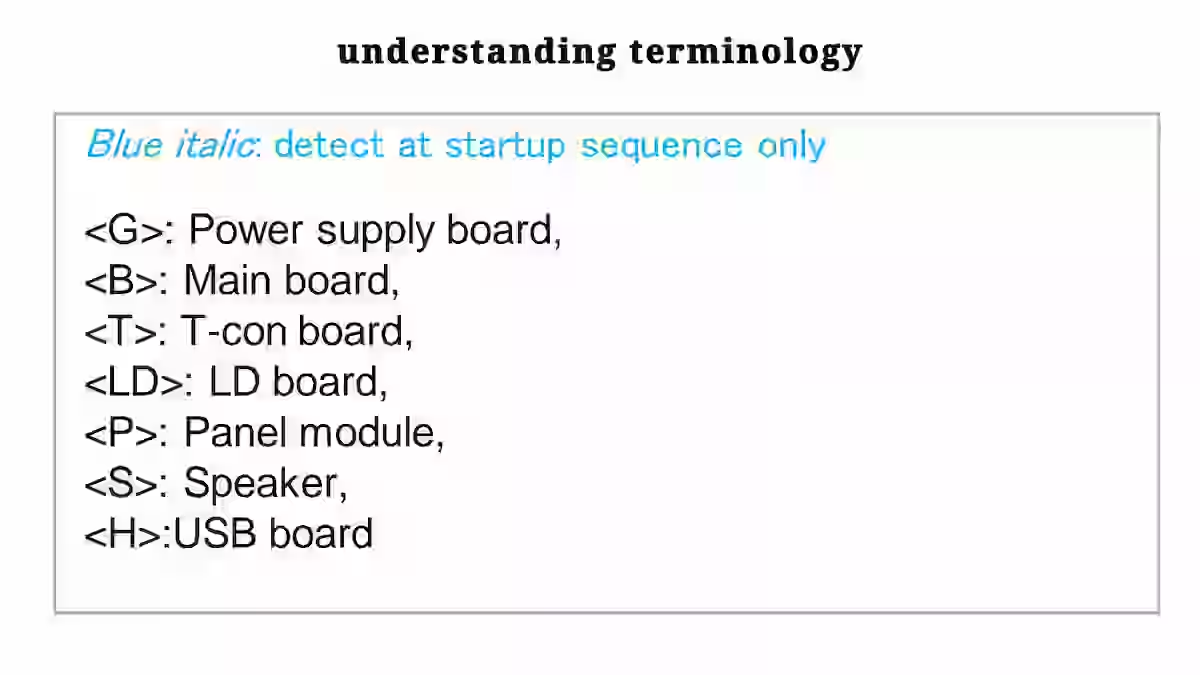
- <G>: Power supply board,
- <B>: Main board,
- <T>: T-con board,
- <LD>: LD board,
- <P>: Panel module,
- <S>: Speaker,
- <H>:USB board
2 Blink red light Error
To diagnose the 2-time blinking error fault, test the 12-volt main supply on pin numbers 5 to 8 of the CN800. If this power supply is present, then you will have to find the reference voltage inside the G board. This reference voltage is generated by the voltage divider resistors.
3 Blink red light Error
3 Blink errors can occur in two sections. DC Alert 5 Volt and Audio Amplifier Section: First you test the 5-volt line. If these voltages are present, then check the speaker and audio error protection in the audio amplifier section. Test the communication of the amplifier IC. Check with System IC. Make sure that every pin of the amplifier IC that goes to the system IC is OK.
4 Blink red light Error
Now let’s come to the 4-blink error fault. According to my experience so far, this is a common fault of new models of Sony LED TVs. To trace this, first of all, you should check the LD board. Test the clock data communication of the LD board and the main board and the LD error point up to the system board.
5 Blink red light Error
The cause of the 5-blink error can be messed-up panel ID clock data, a T-con error, or a panel supply failure. Test the LVDS ribbon cable very carefully. Test all DC to DC voltages for the panel. Overall, this error is related to the panel. A lot of caution is required. Here too, if there is a fault line inside the panel, then this error will occur.
6 Blink red light Error
Six Blink Error Fault This is directly related to the backlight. To solve this, you should first verify the backlight string. You can diagnose it by checking it with a good backlight tester. If it is correct, then you should look at the power board or main board. Usually, this is a backlight fault. If you have to replace it, use the original one.
7 Blink red light Error
7 Blink Error Fault This is due to overtemperature. Search for the temperature sensor IC in the main board and check its connection with the system IC. Trace its clock data line to see if it is connected to the system. Also check the USB circuit of the main board. This error can also be caused by the panel module.
8x 4KBE Error (4KBE WDT)
is a mainboard-related blinking error of Sony LED TVs, which appears when the 4K processing block or main processor cannot start properly during boot and the watchdog timer is triggered.
Common causes of this error include low or unstable regulated supplies of the mainboard, a weak DC-DC converter circuit, corruption of EEPROM or flash data, and a BGA soldering problem under 4KBE or CPU IC. In some cases, fluctuation in the supply coming from the power board can also cause this error.
To solve this problem, first of all, all voltages of the mainboard should be checked thoroughly, weak or non-performing regulators and related components should be corrected, if possible, the EEPROM or software should be reprogrammed, and if the heat test shows a response, BGA IC reworking should be considered.
Conclusion
This KD-65X9500G All Blinking Codes Explained Professional Repair Guide Step-by-Step Blinking Error Code Solution is based on practical technician experience, where each blinking error code of this model is explained with real fault findings, especially the common 4-blink error, to help achieve accurate diagnosis and proper repair.
How to Fix Display Drop Issue in Sony KLV-46R452A

Shaukat Ali has over 30 years of experience in LED TV repair, specializing in chip-level repair work. He is an expert in Sony LED TVs, and also repairs other major brands like Samsung, TCL, Orient, and Haier. His expertise includes display panel faults, motherboard issues, power supply circuits, T-Con, and HDMI faults. Based in Lahore, he shares real-time fault finding cases from daily repair work to help technicians and learners with practical experience.
📞 Contact: +92 321 4066054