
DC-DC Schematic Diagram IC: SM4080
In SM4080 Circuit Diagram Complete Guide, we are sharing the complete schematic diagram of the SM4080 DC-DC converter IC and its practical explanation. This IC is commonly used to generate various voltages of LCD/LED screen panels, like VGH, VGL, and AVDD. In this guide, you will get a basic understanding of the circuit layout, position of important components, and power section, which is very helpful during fault finding. If you want to understand the issues related to panel power supply better, then these diagrams and explanations will be useful for you.
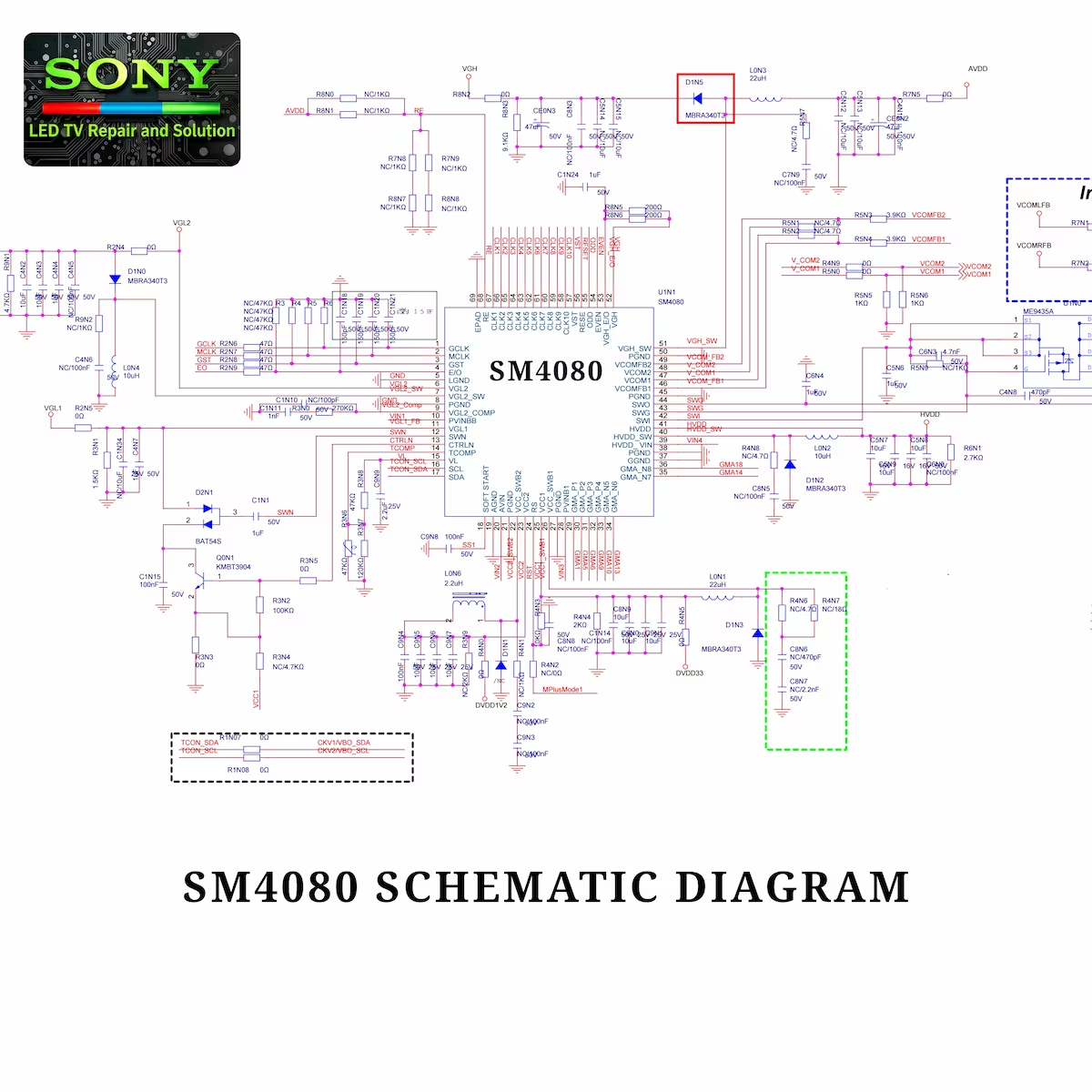
Pin Description SM4080
VCC (12V) – IC: SM4080
The main voltage of this DC-DC converter IC is 12 volts, which provides the basic supply for all the power sections and signal drive of the panel. This voltage serves as the reference voltage for various output lines, such as AVDD, VGH, VGL, DVDD, and other gate drive signals. It is very important that the main voltage remain stable so that all the digital and signal sections of the panel work properly and maintain the brightness of the picture, flicker-free display, and the accuracy of the pixel signals. Testing the 12V main voltage is a basic step during fault finding.
Avdd – IC: SM4080
This pin provides the main power supply for the LCD/LED panel and generally controls the low-voltage sections. The AVDD pin provides the necessary voltage to the various digital and signal drive circuits of the panel, allowing the display to function properly. If the AVDD voltage becomes unstable or missing, the screen may experience low or flickering, half-display, or full-display problems. This pin is one of the main power output pins of the DC-DC converter IC, and checking its voltage is very helpful in fault finding.
VGH – IC: SM4080
This pin is used for the gate drive voltage of the TFT transistors in the LCD/LED panel. The VGH voltage usually provides a high-level signal so that the panel transistors can be fully turned on and the pixels can be lit properly. If the VGH voltage is low or unstable, half-brightness or flickering problems may appear on the screen, and sometimes the entire display may be affected. This pin is one of the main output pins of the DC-DC converter IC, and it is very important to check its voltage during fault finding.
VGL 1 – IC: SM4080
This pin provides a low voltage for the gate drive of TFT transistors in the LCD/LED panel. VGL voltage is usually negative or close to ground level to help turn off pixels and achieve accurate control in the panel. If VGL voltage is low, missing, or unstable, black lines, half display, or flickering problems may occur on the screen. This pin is one of the important output pins of the DC-DC converter IC, and its voltage is important to check during fault finding.
VGL 2 – IC: SM4080
This pin is used for the low-level gate drive voltage of TFT transistors in LCD/LED panels and, together with VGL 1, improves the off-control of pixels. This voltage is usually negative or close to ground to ensure correct signal control in the panel. If the VGL 2 voltage is low, unstable, or missing, black lines, half-display, or flickering problems may occur on the screen. This pin is also important in the output pins of the DC-DC converter IC, and checking its voltage is helpful during fault finding.
VCC1 – IC: SM4080
This pin provides the main supply voltage to the LCD/LED panel and powers various logic and signal drive circuits. The VCC1 voltage must be stable so that the digital section of the panel works properly and there are no problems with signal processing. If the VCC1 voltage is low, unstable, or missing, problems such as half display, flickering, or full display errors may appear on the screen. This pin is one of the important output pins of the DC-DC converter IC, and checking its voltage is very helpful during fault finding.
VCC 2 – IC: SM4080
This pin provides additional supply voltage for the digital and signal drive section of the LCD/LED panel and, together with VCC1, keeps the logic circuits of the panel stable. The voltage of VCC2 must remain stable so that signal processing is correct and display performance is not affected. If the VCC2 voltage is low, unstable, or missing, problems such as half display, flickering, or full display errors may occur on the screen. This pin is also one of the important output pins of the DC-DC converter IC, and its voltage test is very important during fault finding.
DVDD 1V2 – IC: SM4080
This pin provides a low voltage (1.2V) for logic and signal processing in the LCD/LED panel. The DVDD1V2 voltage is essential for the correct operation of the panel’s digital circuits, ensuring stable pixel signals and data processing. If the DVDD1V2 voltage becomes unstable or missing, problems such as half-display, flickering, or data processing errors may occur on the screen. This pin is one of the main output pins of the DC-DC converter IC, and checking its voltage is very helpful during fault finding.
DVDD 33 – IC: SM4080
This pin provides 3.3V logic voltage to the LCD/LED panel, which is essential for digital and signal processing circuits. With the DVDD33 voltage stable, the digital signals of the panel work properly, and there is no error in the pixel signals. If the DVDD33 voltage is low, unstable, or missing, problems such as half display, flickering, or digital signal error may appear on the screen. This pin is one of the important output pins of the DC-DC converter IC, and its voltage test is very useful during fault finding.
HVDD – IC: SM4080
This pin is used to drive the high-voltage signal of the LCD/LED panel and provides the appropriate high-level voltage to the panel transistors and signal section. The HVDD voltage must be stable so that the pixels are properly lit and the display image is clear. If the HVDD voltage is low, unstable, or missing, problems such as flickering, half-brightness, or complete display failure may appear on the screen. This pin is one of the important output pins of the DC-DC converter IC, and checking its voltage is very helpful during fault finding.
V-VCOM 1 – IC: SM4080
This pin provides the common voltage (VCOM) to the LCD/LED panel, which is essential for the correct operation of the pixel transistors. The V-VCOM1 voltage keeps the brightness and contrast of the panel stable and helps in the correct switching of pixel signals. If the V-VCOM1 voltage is low, unstable, or missing, problems such as half-display, non-uniform brightness, or flickering may occur on the screen. This pin is important in the output pins of the DC-DC converter IC, and checking its voltage is very helpful during fault finding.
V-VCOM 2– IC: SM4080
This pin provides the second common voltage (VCOM) to the LCD/LED panel and, together with V-VCOM1, ensures the correct switching of the pixel transistors and the stability of the panel brightness. If the V-VCOM2 voltage is not stable, half-display, non-uniform brightness, or flickering problems may occur on the screen. This pin is one of the important output pins of the DC-DC converter IC, and checking its voltage is very helpful during fault finding.
V-VCOM _ FB1 – IC: SM4080
This pin is used for the VCOM feedback signal in the LCD/LED panel. V-VCOM FB1 monitors the accuracy of the panel common voltage and provides a signal to the DC-DC converter IC to keep the VCOM voltage stable. If this feedback signal is missing or unstable, half-display, uneven brightness, or flickering problems may occur on the screen. Checking the voltage of this pin is very helpful during fault finding to ensure that the panel brightness and signal drive are correct.
V-VCOM _ FB2 – IC: SM4080
This pin provides the second VCOM feedback signal to the LCD/LED panel and controls the accuracy of the common voltage together with V-VCOM FB1. The voltage of V-VCOM FB2 remains stable, ensuring the correct switching of the panel brightness and pixel signals. If this feedback signal is low, unstable, or missing, half-display, non-uniform brightness, or flickering problems may occur on the screen. This pin is important in the output pins of the DC-DC converter IC, and checking its voltage is very helpful during fault finding.
T-CON SCL – IC: SM4080
This pin is used for I²C communication with the T-CON board in the LCD/LED panel and provides click or clock signals on the signal line. The voltage and signal accuracy of the T-CON SCL pin are essential for the panel’s data processing and pixel display performance. If this signal becomes unstable or missing, half-display, flickering, or image defects may appear on the screen. Testing this pin during fault finding is helpful in diagnosing panel signal control problems.
T-CON SDA – IC: SM4080
This pin is used for data signals for I²C communication with the T-CON board in the LCD/LED panel. The panel data signals are sent and received through the T-CON SDA so that the pixels and image are displayed correctly. If this signal is unstable or missing, problems such as half-display, flickering, or image distortion may occur on the screen. Testing this pin during fault finding is very helpful in diagnosing panel signal control problems.
EO – IC: SM4080
This pin is used for power control of the LCD/LED panel and output regulation in the DC-DC converter IC. The EO pin helps monitor and regulate the output voltages of the IC so that the various voltage lines of the panel remain stable. If the EO voltage is unstable or missing, problems such as half display, flickering, or full display error may occur on the screen. Checking the voltage of this pin is very helpful during fault finding to ensure that the performance of the panel power supply is correct.
GST – IC: SM4080
This pin is used for ground reference and power monitoring of the DC-DC converter IC in the LCD/LED panel. The GST pin provides the correct ground reference to the IC so that all voltage lines remain stable and there is no error in signal processing. If the GST voltage or reference becomes unstable or missing, problems such as flickering, half display, or full display error may occur on the screen. Testing this pin is very helpful during fault finding.
MCLK – IC: SM4080
This pin provides the master clock signal to the LCD/LED panel, which is essential for correct signal processing of the T-CON and digital sections of the panel. The MCLK voltage and signal remain stable, allowing the pixel signals to be driven at the correct time and the image to appear clear and stable. If the MCLK signal becomes unstable or disappears, flickering, half-display, or image defects may occur on the screen. Testing this pin is very helpful during fault finding to ensure that the digital signal control is correct.
GCLK – IC: SM4080
This pin provides the gate clock signal to the LCD/LED panel, which is essential for the correct switching of TFT transistors and pixel signals. The voltage and stability of the GCLK signal are important for the correct brightness and flicker-free display of the panel image. If the GCLK signal is unstable or missing, problems such as half-display, flickering, or pixel signal corruption may appear on the screen. Testing this pin is very helpful during fault finding.
CLK1-10 gate drive – IC: SM4080
These pins are used for gate drive signals of TFT transistors in LCD/LED panels and ensure correct switching of pixels. Each CLK pin provides specific timing signals so that pixels in different sections of the panel are turned on or off at the correct time, maintaining image brightness and a flicker-free display. If the voltage of any of these CLK signals becomes unstable or missing, problems such as half-display, flickering, or pixel signal corruption may occur on the screen. These pins play an important role in the gate drive section of the DC-DC converter IC, and checking their voltage and signal is very helpful during fault finding.
VST – IC: SM4080
This pin is used for voltage signal transfer (VST) in LCD/LED panels and helps control the gate drive signals of TFT transistors. By keeping the VST voltage stable, the pixels are turned on or off at the right time, and the brightness of the image and flicker-free display are maintained. If the VST voltage is low, unstable, or missing, problems such as half-display, flickering, or pixel signal errors may appear on the screen. Checking the voltage of this pin is very helpful during fault finding to ensure that the panel’s gate drive signals are correct.
ODD – IC: SM4080
This pin provides gate drive signals for the odd lines in the LCD/LED panel. The ODD pin helps in turning on or off the odd-numbered risers or lines of pixels at the right time, ensuring image accuracy and a flicker-free display. If the ODD signal is unstable or missing, problems like half display, flickering, or uneven brightness of the image may occur on the screen. This pin is important in the gate drive section of the DC-DC converter IC, and checking its voltage and signal is very useful during fault finding.
EVEN – IC: SM4080
This pin provides gate drive signals for even lines in the LCD/LED panel. The EVEN pin helps in turning on or off even numbered risers or lines of pixels at the right time, thereby maintaining the brightness of the image and flicker-free display. If the EVEN signal is unstable or missing, problems like half display, flickering, or pixel signal errors may occur on the screen. This pin plays an important role in the gate drive section of the DC-DC converter IC, and checking its voltage and signal is very helpful during fault finding.
VGH_E/O – IC: SM4080
This pin is used for odd and even lines of VGH (Gate High Voltage) in LCD/LED panels. VGH_E/O voltage provides gate drive signals of TFT transistors at appropriate high level so that pixels turn on at the right time and maintain image brightness and flicker-free display. If this voltage is unstable or missing, problems like half display, flickering, or pixel signal corruption may appear on the screen. This pin is important in the gate drive section of the DC-DC converter IC, and checking its voltage is very helpful during fault finding.
Common Fault – IC: SM4080
This section describes how to check for possible panel faults based on the main voltage and mains voltage of the DC-DC converter IC. Checking the voltage of AVDD, VGH, VGL, DVDD33, HVDD, VCOM, T-CON signals, and gate drive pins such as CLK, VST, ODD, EVEN, and VGH_E/O is the most important step during fault finding. If the voltage of any pin is unstable, low, or missing, it can cause problems such as half display, flickering, pixel signal corruption, or complete display failure. Checking the mains voltage of 12V is also mandatory, as it provides the basic supply for all sections of the panel. Checking the voltage and signal of each pin during fault finding makes it easier to accurately diagnose and repair various panel problems.
Conclusion
In conclusion, the SM4080 Circuit Diagram Complete Guide provides a clear and practical overview of how this DC-DC converter IC works in LCD/LED panel applications. By carefully studying the schematic diagram and understanding the role of each section, you can trace voltage lines more confidently and diagnose panel-related faults with better accuracy. A strong understanding of VGH, VGL, AVDD, and other related outputs makes troubleshooting faster and more reliable. Whether you are repairing a faulty board or simply improving your technical knowledge, this guide can serve as a useful reference for working with SM4080-based panel power circuits.
How to Fix Sony XR-55X90J 4 Blink Error
BD8174MUV Step up DC/DC Converter guide

Shaukat Ali has over 30 years of experience in LED TV repair, specializing in chip-level repair work. He is an expert in Sony LED TVs, and also repairs other major brands like Samsung, TCL, Orient, and Haier. His expertise includes display panel faults, motherboard issues, power supply circuits, T-Con, and HDMI faults. Based in Lahore, he shares real-time fault finding cases from daily repair work to help technicians and learners with practical experience.
📞 Contact: +92 321 4066054