
KDL-60W600B Complete Blink Codes and Their Meanings
Sony KDL-60W600B All Blink Codes Details Specific All Red Light Blinking Codes of this Model This article will explain in detail from 2 blink to 9 red light blink codes. This blinking codes guide is part of a series by Sony LEDT in which we publish all the blinking codes of the same model to help fellow technicians.

Display of standby LED flash count
Display of Standby LED Flash Count First of all, it is very important to understand the red light flash count of Sony LED TVs carefully. It is a cycle. For example, 2 Blink. If there is a fault, the red LED will blink twice, and the time of this blink will be 0.5 seconds. After that, it will take a break of 3 seconds, and the same cycle will repeat.
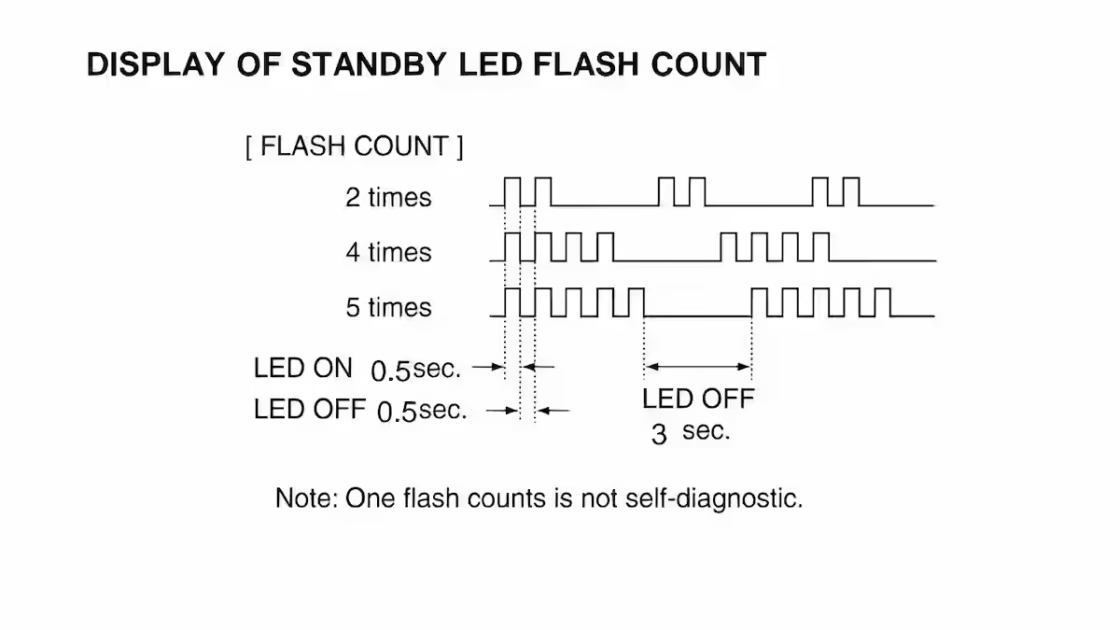
Red Light Blinking Count and Detailed
2 blink error solutions
First of all, let’s talk about 2-time blinking. This blinking error is related to the power supply. If you are facing the two-blink error in this model, then you should first check the main 12V supply. This is a common error. In all Sony LED TVs, it should be considered a power supply error.
3 blink DC alert
The three-blink error covers many sections in this model. This DC alert means that we have to look at all the power supplies on the main board, i.e., the main 5V, 3.3V, 1.8V, 1.1V, 5V, and 1.0V. All these power supplies send their own reference to the system IC so that the system can understand the circuit correctly.
3 Blink amp protection [ AUD_ ERR ]
In a 3-blink fault, you should also check the audio amp section, test the speaker, test the VCC supply of the audio amplifier IC, and check the source connection of the audio amplifier IC to see if there is any disconfirmation with the next circuit.
3 Blink HDMI 12C NACK
In this model, the three-blink fault also requires special attention to the HDMI IC circuit. Since this IC communicates with external devices, there are high chances that it may be damaged. Also check the remaining 12C bus lines to make sure they are properly connected to the system IC. They have 100-ohm resistances in series, so pay special attention to them.
3 Blink tuner or modulator test
Test the tuner modulator. If its power VCC and its 12C, i.e., clock data signal, are disconnected from the system IC, your unit will blink a fault. The 100-ohm resistors that allow this clock data to reach the system IC are also tested. It is usually seen that the tuner burns out due to a voltage spike from the cable. Remove the cover and check.
4 Blink [ LD_ ERR ] and back light
The 4-blink error fault in these models is due to LD ERROR. This usually means that you should take the backlight circuit board. In a large unit, since this board is installed separately, the first thing you need to do is to check whether this board is boosting the voltage or not. If it is boosting the voltage, then you should check the backlight. Since this article is not about fault-finding, I am providing general information in it.
5 Blink panel error
A 5-blink panel error occurs; in this, you first have to check the DC to DC supplies of the panel and check the 12C clock data going to the panel ID to see if it is in sync with the main board. In addition to this, if there is any problem inside the panel, you will also face the same error. My advice is to confirm the panel with a different board.
6 Blinking solution
The solution to the 6-blink error is to test the backlight circuits carefully with an external backlight tester. In this case, the backlight is usually faulty. Another thing is to test the LD board to see if there is any overvoltage coming from there. This problem can be caused by feedback in the circuit.
7 blink red light error
7 blinking red light error This fault occurs due to temperature error; for this you will have to search for the temperature sensor IC in the main board and check its clock data to see if it is in sync with the system IC or not. Here too you will find a 100-ohm resistor between the system and sensor IC.
8 blink red light fault
8 blinking red light faults This indicates a software error, but in my experience, in most cases, it is due to bad sectors in the EMM flash. Sony’s main firmware is stored in this flash, and Sony only updates the final version of the unit from its system. This issue is quite complicated.
Double tap and then scroll to detail preview
Conclusion
Sony KDL-60W600B All Blink Code Details In this article, we have written in detail all the blinking error codes of this specific model of Sony LED TV. Sony LED TV Repair is writing a series on this topic. Some codes are common in Sony, but if the technician gets complete and detailed information, it makes his work easier. We will continue to publish such articles.
KLV-40R352C No Display Panel Fix
LED TV Schematic Diagrams Database

Shaukat Ali has over 30 years of experience in LED TV repair, specializing in chip-level repair work. He is an expert in Sony LED TVs, and also repairs other major brands like Samsung, TCL, Orient, and Haier. His expertise includes display panel faults, motherboard issues, power supply circuits, T-Con, and HDMI faults. Based in Lahore, he shares real-time fault finding cases from daily repair work to help technicians and learners with practical experience.
📞 Contact: +92 321 4066054
Sir
i am very thankful to share this knowledge
Keep visiting the website,Brother will find a lot here, all of this is for the help of technicians.