
This guide fixes all blinking errors on KLV-46R452A
KLV-46R452A Complete Red Light Blinking Guide In this, you will learn how to diagnose all the blinking code error faults of this Sony series. We will explain in detail all its red light blinking codes, from 2-blink to 6-blink faults, and their causes and solutions. In this article, we will create a knowledge base article based on theory, charting it and our own experiences. Sony LED TV Repair Center Lahore writes such articles to help fellow technicians so that they can understand them in their true sense.
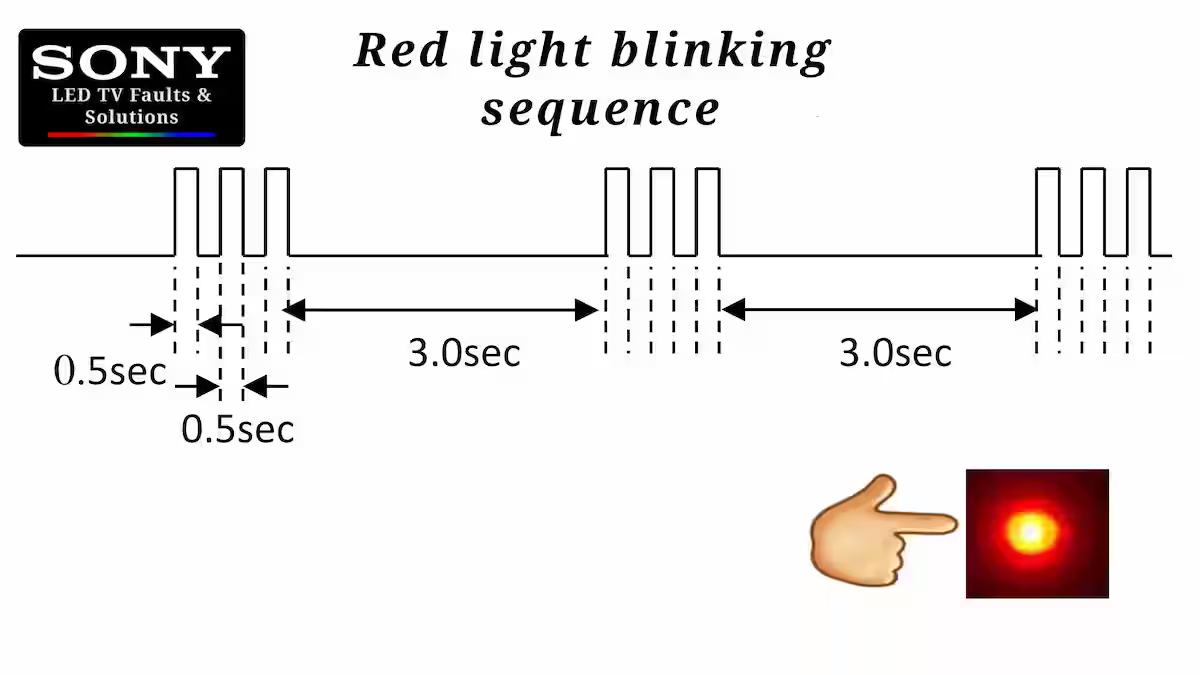
Red light blinking sequence
First of all, you need to understand its red light blinking sequence because, in my experience, the user does not understand this sequence properly. As you can see in the image below, The cycle of blinking of the red light is zero point five seconds, after which there is a pause of three seconds, then the same cycle continues. Let me explain to you with an example. Suppose the fault is six blinks; then the red light remains on for zero point five seconds and then in the off condition for the same amount of time, after which it takes a break of three seconds.
2 Blink red light error
Almost all blinking codes in Sony’s R series have the same meaning, especially the two blinking errors caused by the main power supply being 19 volts. The main system processor needs a reference of 2.1 voltage. From the main power supply, these reference main boards provide two resistors, which in technical language are called voltage dividers. One resistor is supplied with the mains supply, and the other resistor is grounded from the other end. A 100-ohm resistor connects the processor IC to their common point. If you are facing this error, you should carefully check the voltage divider resistance.
3 Blink error solutions
If you want to solve this error, then you should pay attention to the audio amplifier IC. You should check the VCC power supply of the audio amplifier IC and test the speaker, and because this is the audio amplifier, the IC is class 4 digital. What I mean by that is that this part uses a digital source for communication with the system IC, which has four to six pins, and these pins are connected through a 100-ohm resistor through the system. These arrays are resistors connected in series and transfer data to the system, which is the cause of the fault.
4 Blink fault solution
In these models, this issue is related to the VCC voltage of the panel. If the panel’s switching MOSFET is not giving output for some reason, check it. If this is correct, then you will have to search for its reference. The same theory applies here that the system IC needs a reference from this voltage line. If you trace this VCC, you can easily find the voltage divider. Test to see if these resistors are OK; their value has not increased. Here too you will find a 100-ohm resistor; maybe check it.
5 blink error solutions
This error is related to a direct panel fault. First, check the LVDS ribbon cable to see if it is properly connected from the mainboard to the panel or if it has any rust or particles on its points. If it is OK, then check the Panel IDIC in the panel because this is where the clock data comes from the system. Check the DC-to-DC circuit of the panel to see if it is working or not. My experience is that even if there is a fault inside the panel, the set will still blink five times. The better method is to test the panel with a separate board.
6 time blinking fix
This problem is usually caused by a faulty backlight, but here we will also mention its circuit. It is a good practice to check the overall backlight with an external meter and then move on. If you are sure that my backlight is fine, then only then focus on the circuit. Here you will find the backlight. Check the supply of the IC in the boost driver circuit. Usually people turn off its protection. This is very dangerous. Do not do this. Carefully test the resistance connected to the IC-related Or read our Six Billing Error Fault Finding article.
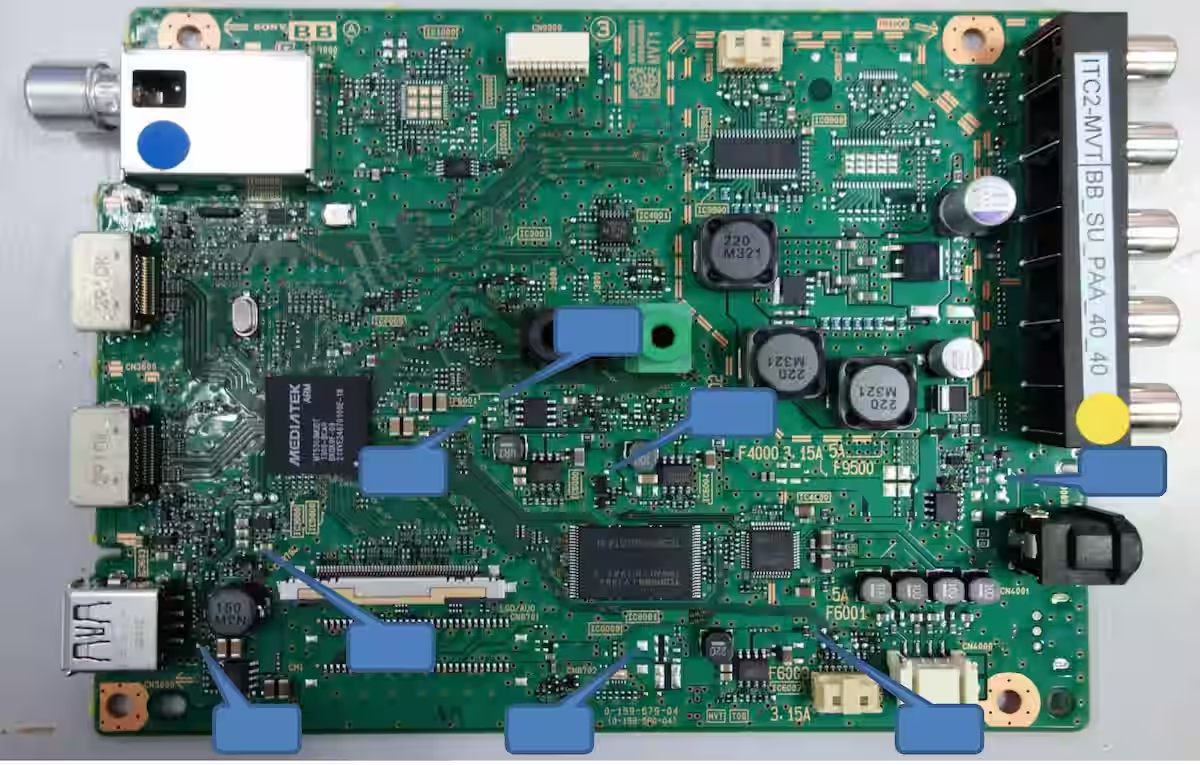
Main board image
| Pin No | Detection Items | Board Error | |
|---|---|---|---|
| 2 | Main Power Error | AC adapter | |
| 3 | Audio Error | BB board Error | |
| 4 | Panel Error | BB board Error | |
| 5 | Panel Power Error | BB or Source board Error | |
| 6 | Backlight Error | BB board Error | |
| NC |
Conclusion
KLV-46R452A Complete Red Light Blinking Guide You have seen that we have discussed this specific model in detail and shared our knowledge in light of our experiences on how to resolve each error code fault. Each paragraph of this article completely covers its fault. It does this and also suggests a solution. This is a general article; it contains possible fault-finding. If you have any questions, write them down and we will answer them. You can also give us your suggestions on what you would like to see.
Samsung UA32K4000AR Restart Problem Fix
Nt39538h-C1260A COF Data with Scalar Info
Sony KDL-60W600B All Blink Codes Details

Shaukat Ali has over 30 years of experience in LED TV repair, specializing in chip-level repair work. He is an expert in Sony LED TVs, and also repairs other major brands like Samsung, TCL, Orient, and Haier. His expertise includes display panel faults, motherboard issues, power supply circuits, T-Con, and HDMI faults. Based in Lahore, he shares real-time fault finding cases from daily repair work to help technicians and learners with practical experience.
📞 Contact: +92 321 4066054